Dominic Cleal's Blog

Extending Foreman quickly with hook scripts

Foreman integrates with a bunch of systems such as DNS (BIND, AD), DHCP (ISC) and Puppet when systems get created and destroyed. It does most of this via its smart proxy architecture, where an agent (the proxy) is deployed on your other servers which gets called from your central Foreman host during "orchestration".

Most production setups are a bit more complex though with other systems we don't integrate with in Foreman, so the plugin support in version 1.1 is there to extend Foreman's capabilities. Since this means learning some Ruby and Rails, I've released foreman_hooks so admins can instead write simple shell scripts to hook straight into Foreman's orchestration feature.
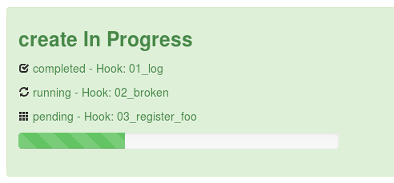
I'm going to walk through a example hook to run a PuppetDB command to clean up stored data (facts, resources) when hosts are deleted in Foreman. First we'll install the plugin by adding this config file:

# echo "gem 'foreman_hooks'" > ~foreman/bundler.d/foreman_hooks.rb
And then run this to install and restart Foreman:
# cd ~foreman && bundle update foreman_hooks
Fetching source index for http://rubygems.org/
...
Installing foreman_hooks (0.3.1)
# touch ~foreman/tmp/restart.txt

(Debian users will need to do: sudo -u foreman bundle update instead, due to packaging differences.)

Next, we'll create a hook script that runs when a managed host is destroyed in Foreman:

# mkdir -p ~foreman/config/hooks/host/destroy
# cat << EOF > ~foreman/config/hooks/host/destroy/70_deactivate_puppetdb
#!/bin/bash

# We can only deactivate data in PuppetDB, not add it
[ "x$1" = xdestroy ] || exit 0

# Remove data in PuppetDB, supplying the FQDN
#
# assumes sudo rules set up as this runs as 'foreman':
#   foreman ALL = NOPASSWD : /usr/bin/puppet node deactivate *
#   Defaults:foreman !requiretty
#
sudo puppet node deactivate $2
EOF

# chmod +x ~foreman/config/hooks/host/destroy/70_deactivate_puppetdb

(on Foreman 1.2, change "host" in the path to "host/managed")

There are a few things here to note. The path we're creating under config/hooks/ refers to the Foreman object and event (see the README). For hosts we can use "create", "update" and "destroy" to extend the orchestration process and there similar events for every other object in Foreman. The 70 prefix influences the ordering with other tasks, see grep -r priority ~foreman/app/models/orchestration for more.

The script gets two arguments, the first is the event name ("destroy" etc) and very importantly for orchestration events, this can change. If an orchestration task fails, the process will get rolled back so the script will then be called with the opposite event to the one it was first called with. For example, a hook in the create/ directory will first be called with "create", then a later task may fail and it will be called again with "destroy" to revert the change. Orchestration of DNS records etc in Foreman works in the same way. Since this example is only able to remove data and not add it, the first line checks the argument and exits if it isn't asked to destroy. Other scripts should take note of value of this argument.

The second argument is the string representation of the object, i.e. the FQDN for host objects. On stdin, we receive a full JSON representation which gives access to other attributes. There are helpers in hook_functions.sh to access this data, see examples/ to get a copy.

Lastly in this example, we run the PuppetDB command to remove the data. The exit code of orchestration hooks is important here. If the exit code is non-zero, this will be treated as a failure so Foreman will cancel the operation and roll back other tasks that were already completed.

Now when the host gets deleted from either the Foreman UI or the API, the host gets deactivated in PuppetDB:

# puppet node status test.fm.example.net
test.fm.example.net
Deactivated at 2013-04-07T13:39:59.574Z
Last catalog: 2013-04-07T11:56:40.551Z
Last facts: 2013-04-07T13:39:30.114Z
There's a decent amount of logging, so you can grep for the word "hook" in the log file to find it. You can increase the verbosity with config.log_level in ~foreman/config/environments/production.rb.
# grep -i hook /var/log/foreman/production.log
Queuing hook 70_deactivate_puppetdb for Host#destroy at priority 70
Running hook: /usr/share/foreman/config/hooks/host/destroy/70_deactivate_puppetdb destroy test.fm.example.net

One area I intend on improving is being able to interact with Foreman from within the hook script. At the moment, I'd suggest using the foremanBuddy command line tool from within your script - though you shouldn't edit the object from within the hook, unless you're using the after_create/after_save events.

I hope this sets off your imagination to consider which systems you could now integrate Foreman into, without needing to start with a full plugin. Maybe we could begin collecting the most useful hooks in the community-templates repo or on the wiki.

(PuppetDB users should actually use Daniel's dedicated puppetdb_foreman plugin. I hope development of dedicated plugins down the line will happen as a natural extension.)
Introducing tests for Augeas resources in Puppet

Augeas resources in Puppet have always been a bit of a black box, as they use somewhat esoteric commands (based on augtool, but with a different parser), are often not idempotent without some work, and are difficult to test.

Last year I wrote about a small test framework I'd written for augeasproviders, a set of new types and providers. These tools allowed me to check the providers were making the change correctly and were idempotent.

Before his talk on testing Puppet modules at Puppet Camp Ghent, vStone asked me about testing Augeas resources in the same way, so I decided to refactor this code into a new extension for Tim Sharpe's rspec-puppet tool, so it could be used against resources in manifests.

rspec-puppet-augeas is a small gem you can install to run Augeas resources inside your rspec-puppet tests. It runs the resource against as many test fixture(s) as you like, then runs it again to make sure it's idempotent. It can provide debug output from the provider when it goes wrong, and adds many file inspection tools to check it went right.

The README has info on setting up (it's quick) and I've published an example module showing how it should look. There are lots of examples showing off each feature inside the project tests themselves.

Feedback gratefully received. File issues, PRs or contact me on IRC.

Testing techniques for Puppet providers using Augeas

Over the past few months I've continued working on augeasproviders, a Puppet module that implements a few providers which use the Augeas configuration API to modify files. One of the interesting challenges has been testing providers, which I'm going to explain in this entry.

The challenge appears quite simple: the provider will alter the contents of a config file by adding, removing or editing a line and the spec (that is, a set of RSpec examples using the puppetlabs_spec_helper) has to test this was successful. Unlike core Puppet providers which may alter package databases and entire system state, augeasproviders operates only on individual files and so it can be run safely within a test harness.

The main flow of testing is shown above and follows ths sequence:

  1. A temporary copy is made of a fixture file (sample input file) which here is a typical /etc/hosts file. The resource is created on the fly from the type, referencing the temporary copy made of the fixture.
  2. The resource is added to a Puppet catalog instance and the catalog, containing a single resource is applied using Puppet. This tests the provider in a near "real life" setting, as all normal provider functionality will be used.
  3. Puppet will call methods to create, destroy or change individual parts of an existing resource via getter/setter methods. In augeasproviders, these use the Augeas API to open the target file, make the change or retrieve the value and close the file.
  4. The catalog run will complete and the temporary fixture will have been updated with any changes made. If there have been any resource failures or log messages at warning or above, the spec fails.
  5. A second catalog run is now performed in order to catch idempotency problems, which shouldn't produce any further changes. If a getter and setter aren't consistent, then Puppet will attempt to set a property on every run since the two implementations differ. This useful test discovered a few issues in augeasproviders.

Now the updated fixture is complete, the contents need to be tested. Originally tests were using the Augeas API again to load the fixture and then check certain parts of the tree. Since the file has been persisted to disk using a lens that is tested and typechecked upstream, this is pretty safe and allows us to skip over implementation details such as whitespace formatting within the output.

Unfortunately it's a very verbose way of testing. Improving on this was to use the augparse utility shipped with Augeas, normally used for testing lenses transform between a sample file and a given tree. The spec was changed to generate a module for augparse that took the fixture and an "expected tree" in the spec and compared the two via the lens.

An additional feature of this was to filter the full fixture into just the line that was expected to change, meaning only part of the entire file would need to be tested against a tree. (Clearly a bad bug could cause other parts to change, but it's a trade-off to maintain the tree text for the entire file.)

The above techniques used to test the augeasproviders code could easily be adapted into other provider tests, whether or not the provider itself uses the Augeas API.

Update: the new idempotency code and all the fixes it's helped with have now been released as version 0.3.0.

Alternative Augeas-based providers for Puppet

Puppet has a few core types such as host for populating /etc/hosts and mailalias for /etc/aliases that use an internal parsedfile helper. You'll be familiar with this if you've ever seen it announce the following in any file it touches:

# HEADER: This file was autogenerated at Sun Mar 04 17:45:13 +0000 2012
# HEADER: by puppet.  While it can still be managed manually, it
# HEADER: is definitely not recommended.

It also rewrites the entire file, ignoring the whitespace you'd carefully placed in existing entries. While you can simply template the entire file, or use Augeas resources to do it, I wanted to improve the built in types.

So I've released a module called augeasproviders that contains new provider implementations for host and mailalias, using the Augeas library under the covers. Augeas is good at preserving the existing format of the file while reading, editing and adding additional entries (though it can't copy formatting yet).

No Augeas knowledge is necessary, just download, enable pluginsync and set the default provider.

Creating RSS/podcast feeds from iPlayer radio programmes

Last night, Chris mentioned that he's been wanting to set up an RSS feed for radio programmes available from iPlayer. All the bits were there - the excellent get_iplayer, MP3 converters, RSS and Google Listen for Android.

I also listen to the BBC's Friday Night Comedy podcast on the train, but miss out on the evening shows from Monday to Thursday while I'm travelling. Here's how I set up a private podcast feed.

Pre-requisites:
  1. get_iplayer
  2. flvstreamer to download radio programmes with get_iplayer quickly (don't rely on mplayer).
  3. ffmpeg to convert from AAC, ensure your copy has MP3 support if you need it.
  4. id3v2 for get_iplayer to tag the resulting audio files.
  5. MP3::Podcast to easily generate the RSS feed, plus a small patch. I suggest using cpanm to build your own Perl libs dir like so: cpanm -l ~/pvr/lib MP3::Podcast

get_iplayer has a great PVR mode which stores any set of command line arguments for search keywords, format and output options allowing you to run it in a one-shot mode to fetch all the current programmes. Here's my configuration, explained below:

get_iplayer --pvr-add r4comedy \
    --type=radio --category=comedy --channel="4$" \
    -o ~/downloads/pvr/r4comedy/ --nopurge \
    --aactomp3 --mp3vbr=8 --modes=flashaacstd,flashaaclow --tag-fulltitle
Line 1: add a new PVR entry titled "r4comedy". View and manage PVR entries with --pvr-list, --pvr-del etc.
Line 2: search for radio comedy programmes on Radio 4 (the regex prevents Radio 4 Extra programmes from being returned).
Line 3: output directory, don't delete old ones.
Line 4: convert to MP3, variable bit rate, download in AAC and tag with the name of the show.

A small script on a cronjob runs get_iplayer --pvr and regenerates the RSS feed using genpodcast.pl from the MP3::Podcast examples:

#!/bin/bash
LIBDIR=/path/to/pvr
OUTDIR=/path/to/pvr/downloads
IPLAYER=/path/to/get_iplayer

$IPLAYER --pvr >/dev/null 2>&1

# Delete after 2 weeks
find $OUTDIR -name "*.mp3" -mtime +14 -delete

# Update RSS feeds
perl -I${LIBDIR}/lib/lib/perl5/ $LIBDIR/genpodcast.pl \
    $OUTDIR "http://example.com/pvr" \
    r4comedy "Radio 4 Comedy" > $OUTDIR/r4comedy/index.rss

And lastly the output directory is added to the Apache config so it's accessible:

Alias /pvr /path/to/pvr/downloads
<Directory "/path/to/pvr/downloads">
    DirectoryIndex index.rss
</Directory>
The URL http://example.com/pvr/r4comedy/ can simply be added to your podcast/RSS client.

Arduino powered switch to trigger VoIP PTT

TSPTT is a simple project to link up a physical switch, via an Arduino to the PC in order to trigger the PTT on a VoIP program (e.g. TeamSpeak, hence "TS").

The Arduino program is small and just prints a 0 or 1 to the USB->serial connection whenever the state of the switch changes, making it easy to read from the PC.

On the PC, I tried Gobetwino, a closed-source "proxy" that parses commands sent over serial to the Arduino. Unfortunately it can't hold keys down, only press them, at which point I found Rajarshi Roy's blog post on the same subject.

Rajarshi pointed out the Java API (java.awt.Robot) for key presses, in order to trigger the PTT. Along with the rxtx serial Java library, this makes up TSPTT. The code simply installs a systray icon, monitors the serial port and applies key presses and releases as required.

My TSPTT JAR is available here, set up for F5 as the PTT and COM3 or /dev/ttyUSB0 as the serial port (rxtx must be installed too).

Older entries are hidden, but you can browse them with the date categories at the top-right of this page.

Created by Chronicle v3.5

Archives